

Virtual try-on is easy to add and surprisingly hard to evaluate. Case studies quote headline numbers, but reported results vary widely by catalog, price point, traffic mix, and how the feature is rolled out — which means the only figures you can trust are the ones from your store.
This is a practical guide to measuring that impact honestly: what to track, how to set up a test you can believe, and the common mistakes that make a feature look better — or worse — than it really is.
Decide What "Working" Means Before You Start
The most common measurement mistake happens before any data is collected: not defining success. Pick a single primary metric the feature is meant to move — for most stores that is product-page conversion rate — and a short list of guardrail metrics that must not get worse, such as return rate and average order value. Writing this down first stops you from cherry-picking whichever number happened to go up after launch.
Categorize Your Metrics Before You Measure
A useful measurement setup separates the metric you're trying to improve from the ones that provide context. Broadly, they fall into four groups:
A Metric Framework for Try-On
Group your metrics by role so you know which one actually decides success.
One metric deserves special attention: try-on engagement rate — the share of visitors who actually use the feature. It's the bridge between "we shipped it" and "it changed behavior," and it's essential for the honest analysis described below.
Run a Clean A/B Test, Not a Before-and-After
It's tempting to compare the month before launch with the month after and call the difference "the lift." Don't. Before-and-after comparisons absorb everything else that changed in that window — seasonality, promotions, ad spend, traffic sources — and hand it all to the feature. A far more reliable approach is a controlled A/B test:
- Split traffic randomly on the product page into a control group (no try-on) and a test group (try-on available).
- Keep everything else identical between the two groups so the feature is the only difference.
- Run it long enough to reach a pre-decided sample size, ideally spanning full weekly cycles so weekday/weekend behavior is represented.
- Compare the primary and guardrail metrics across the two groups, not against history.
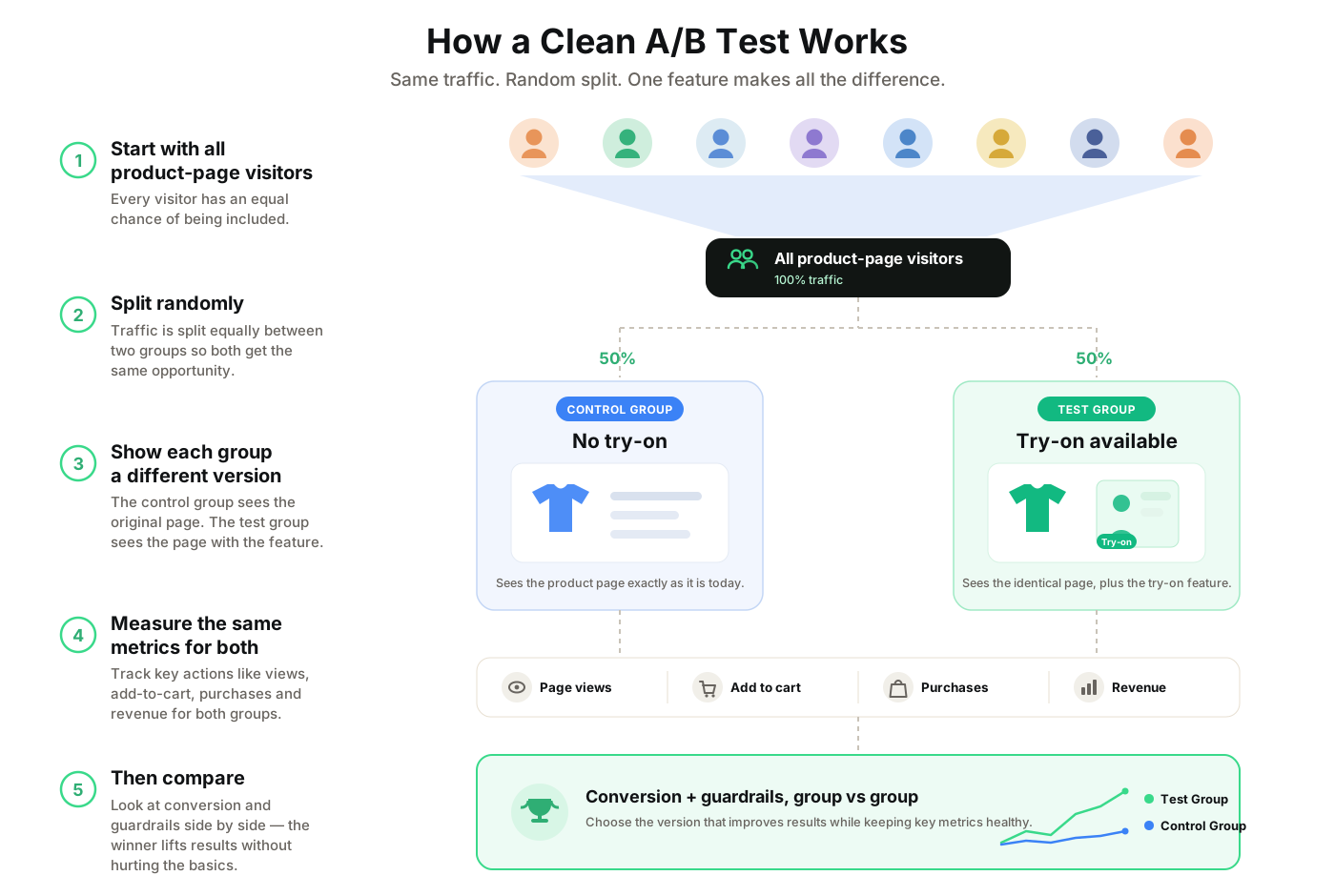
A before-and-after tells you what happened. Only a controlled test tells you what the feature caused — and that difference is the whole point of measuring.
The Pitfalls That Fool People
Even a well-intentioned test can mislead if these traps go unnoticed:
- Self-Selection Bias: Shoppers who choose to use try-on are often already more interested, so "try-on users convert better" can overstate the effect. Compare whole randomized groups, not users-who-engaged vs everyone else.
- Insufficient Sample Size: A few hundred sessions can swing on noise. Decide the sample size up front and wait for it before reading results.
- The Novelty Effect: A new feature can spike simply because it's new. A longer window helps separate lasting impact from initial curiosity.
- Ignoring Guardrails: A conversion bump that comes with a rise in returns may not be a win at all. Always read the guardrail metrics alongside the primary.
- Seasonality & Promotions: Overlapping sales or holidays can dwarf the effect you're measuring; account for them or avoid testing across them.
Reading the Results Honestly
When the test ends, resist the urge to reduce it to one number. Check whether the difference is statistically meaningful rather than within normal fluctuation. Then segment: try-on impact can differ a lot by device and by product category, and an average can hide both a strong result and a flat one. We covered why category matters in which products benefit most from virtual try-on. Finally, confirm the guardrails held — a genuine win improves the primary metric without degrading returns or margin.
A Sensible Rollout Sequence
You don't have to decide everything at once. A low-risk path is to pilot on a single category where you expect the clearest signal, measure it properly, and expand based on what you learn rather than on a vendor's headline figure. For background on how try-on tends to affect the two metrics people care about most, see what's been reported on conversion rates and return rates — useful as context to compare against, not as promises to expect.
Turn it on for one category where you expect the clearest signal.
Run the clean A/B test and read the primary and guardrail metrics.
Roll out to more categories based on your evidence, not a headline figure.
Where TryOnKit Fits
Good measurement depends on clean data, so TryOnKit emits try-on lifecycle events — such as when a shopper starts a try-on or a result is generated — that you can forward straight into your own analytics. That makes it straightforward to track engagement rate and wire the feature into the A/B test described above instead of guessing at its impact. For the technical context, see how AI virtual try-on works or the Shopify virtual try-on page.
So put it to the test on your own catalog. Add TryOnKit to a single high-uncertainty category, connect its events to your analytics, and run the clean A/B test outlined here — then let your own numbers make the call. Book a demo to get set up, and start measuring real impact this week.